


| Home | Games | Downloads | Ramblings | About |
jME-CircleShader - Advanced
| Download: | |
| jME-CircleShader.zip: | Download |
geom = new Geometry("Quad", new Quad(480, 480));
Material mat = new Material(assetManager, "Common/MatDefs/Circle/Circle.j3md");
mat.setColor("Color", ColorRGBA.White);
mat.setColor("Color2", new ColorRGBA(0f, 0f, 1f, 0f));
mat.setFloat("Offset", 0.5f);
mat.setFloat("Radius", 0.25f); //Circle's radius.
mat.setFloat("X", 0.75f); //Center x-axis.
mat.setFloat("Y", 0.75f); //Center y-axis.
geom.setMaterial(mat);
geom.setLocalTranslation(80, 0, 0);
guiNode.attachChild(geom);
Material mat = new Material(assetManager, "Common/MatDefs/Circle/Circle.j3md");
mat.setColor("Color", ColorRGBA.White);
mat.setColor("Color2", new ColorRGBA(0f, 0f, 1f, 0f));
mat.setFloat("Offset", 0.5f);
mat.setFloat("Radius", 0.25f); //Circle's radius.
mat.setFloat("X", 0.75f); //Center x-axis.
mat.setFloat("Y", 0.75f); //Center y-axis.
geom.setMaterial(mat);
geom.setLocalTranslation(80, 0, 0);
guiNode.attachChild(geom);
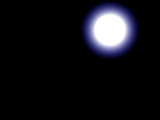 The positions of each color in the circle is set as a percentage, from 0.0-1.0, along the circle's radius so when you change the radius color bands and the center offset are scaled appropriately. The radius and the circle's center are percentages of the quad's width/height so the default center value of X=0.5, Y=0.5 is the center of the quad and the default radius of 0.5 creates a circle with a diameter that spans the full width of the quad.
Okay, let's put our circle back to the default center and radius then add a few extra colors:
mat.setColor("Color", ColorRGBA.Red);
mat.setFloat("Offset", 0.0f);
mat.setColor("Color2", ColorRGBA.Orange);
mat.setFloat("pos2", 0.167f);
mat.setColor("Color3", ColorRGBA.Yellow);
mat.setFloat("pos3", 0.334f);
mat.setColor("Color4", ColorRGBA.Green);
mat.setFloat("pos4", 0.501f);
mat.setColor("Color5", ColorRGBA.Blue);
mat.setFloat("pos5", 0.668f);
mat.setColor("Color6", new ColorRGBA(0.75f, 0, 1, 1));
mat.setFloat("pos6", 0.835f);
mat.setColor("Color7", new ColorRGBA(0.75f, 0, 1, 0));
mat.setFloat("Offset", 0.0f);
mat.setColor("Color2", ColorRGBA.Orange);
mat.setFloat("pos2", 0.167f);
mat.setColor("Color3", ColorRGBA.Yellow);
mat.setFloat("pos3", 0.334f);
mat.setColor("Color4", ColorRGBA.Green);
mat.setFloat("pos4", 0.501f);
mat.setColor("Color5", ColorRGBA.Blue);
mat.setFloat("pos5", 0.668f);
mat.setColor("Color6", new ColorRGBA(0.75f, 0, 1, 1));
mat.setFloat("pos6", 0.835f);
mat.setColor("Color7", new ColorRGBA(0.75f, 0, 1, 0));
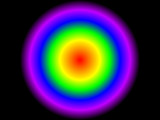 You can place up to seven colors in a single circle. You must use all the colors between Color and ColorN so if you're using three colors you must use Color, Color2 and Color3, you cannot skip a color such as Color, color2 and Color5. In the latter case you will only see the first and second color.
As mentioned earlier the position of each color is set as a percentage along the circle's radius between 0.0(center) and 1.0(edge). You do not need to set the position of the final color in your color scheme as this color will automatically be positioned at 1.0. A latter color cannot be positioned before a former color. If Color2 is positioned at 0.2 and Color3 is positioend at 0.1 then Color3 will be reset to position 0.2 starting immediately after Color2.
Just for kicks let's create a ring:
geom = new Geometry("Quad", new Quad(480, 480));
Material mat = new Material(assetManager, "Common/MatDefs/Circle/Circle.j3md");
mat.setColor("Color", new ColorRGBA(0f, 0f, 0f, 0f));
mat.setColor("Color2", new ColorRGBA(0.3f, 0.55f, 1f, 0.35f));
mat.setColor("Color3", new ColorRGBA(0.3f, 0.76f, 1f, 1f));
mat.setColor("Color4", new ColorRGBA(0.5f, 0.9f, 1f, 1f));
mat.setColor("Color5", new ColorRGBA(0f, 0f, 0f, 0f));
mat.setColor("Color6", new ColorRGBA(0f, 0f, 0f, 0f));
mat.setFloat("Offset", 0.5f);
mat.setFloat("pos2", 0.86f);
mat.setFloat("pos3", 0.9f);
mat.setFloat("pos4", 0.95f);
mat.setFloat("pos5", 0.97f);
mat.setFloat("Radius", 0.35f);
geom.setMaterial(mat);
geom.setLocalTranslation(80, 0, 0);
guiNode.attachChild(geom);
Material mat = new Material(assetManager, "Common/MatDefs/Circle/Circle.j3md");
mat.setColor("Color", new ColorRGBA(0f, 0f, 0f, 0f));
mat.setColor("Color2", new ColorRGBA(0.3f, 0.55f, 1f, 0.35f));
mat.setColor("Color3", new ColorRGBA(0.3f, 0.76f, 1f, 1f));
mat.setColor("Color4", new ColorRGBA(0.5f, 0.9f, 1f, 1f));
mat.setColor("Color5", new ColorRGBA(0f, 0f, 0f, 0f));
mat.setColor("Color6", new ColorRGBA(0f, 0f, 0f, 0f));
mat.setFloat("Offset", 0.5f);
mat.setFloat("pos2", 0.86f);
mat.setFloat("pos3", 0.9f);
mat.setFloat("pos4", 0.95f);
mat.setFloat("pos5", 0.97f);
mat.setFloat("Radius", 0.35f);
geom.setMaterial(mat);
geom.setLocalTranslation(80, 0, 0);
guiNode.attachChild(geom);
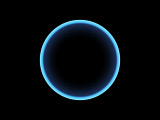 For this particular ring we only need six of the seven available color slots. Notice we didn't need to set pos6 because this was automatically set to 1.0. We needed Color6 because we don't want the final fade to fade from the edge of the ring all the way to the edge of the circle's radius so instead we create Color5 and position it where we want the final fade to end then create Color6, which is the same color as Color5, so that final transparent color extends out to the circle's radius.
Let's go back to our simple white circle and add a texture. You can add a color texture to any circle, the texture will be used to multiply the circle's color and alpha values. Here we're going to multiply our basic white circle with a black and white smokey texture. Note that the smoke texture is not only black and white, but also has an alpha channel which is used to multiply the circle's alpha channel.
geom = new Geometry("Quad", new Quad(480, 480));
Material mat = new Material(assetManager, "Common/MatDefs/Circle/Circle.j3md");
mat.setColor("Color", ColorRGBA.White);
mat.setTexture("ColorMap", assetManager.loadTexture("Textures/CloudTexture.png"));
geom.setMaterial(mat);
geom.setLocalTranslation(80, 0, 0);
guiNode.attachChild(geom);
Material mat = new Material(assetManager, "Common/MatDefs/Circle/Circle.j3md");
mat.setColor("Color", ColorRGBA.White);
mat.setTexture("ColorMap", assetManager.loadTexture("Textures/CloudTexture.png"));
geom.setMaterial(mat);
geom.setLocalTranslation(80, 0, 0);
guiNode.attachChild(geom);
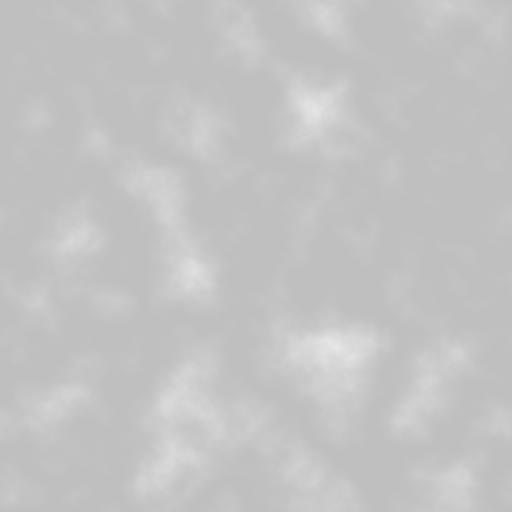
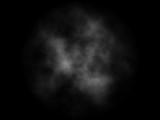 The entire texture is displayed on the quad multiplied by the circle. Note that you can tile the texture so that the quad displays less of the texture or displays the texture multiple times. You can also animate the texture's offset to scroll the texture or use sprite sheets.
Texture tex = assetManager.loadTexture("Textures/CloudTexture.png");
tex.setWrap(WrapMode.Repeat);
mat.setTexture("ColorMap", tex);
mat.setFloat("TileColX", 2); //Tile the texture 2 times on the x-axis.
mat.setFloat("TileColY", 2); //Tile the texture 2 times on the y-axis.
mat.setFloat("OffsetColX", 0.625f); //Offset the texture on the x-axis.
mat.setFloat("OffsetColY", 0.625f); //Offset the texture on the y-axis.
tex.setWrap(WrapMode.Repeat);
mat.setTexture("ColorMap", tex);
mat.setFloat("TileColX", 2); //Tile the texture 2 times on the x-axis.
mat.setFloat("TileColY", 2); //Tile the texture 2 times on the y-axis.
mat.setFloat("OffsetColX", 0.625f); //Offset the texture on the x-axis.
mat.setFloat("OffsetColY", 0.625f); //Offset the texture on the y-axis.
Notice in the above code we loaded the texture and set the WrapMode before assigning it to the Material. If we're going to tile and offset the texture we should be sure that we can repeat it. By default jMonkeyEngine assings WrapMode.Clamp to textures meaning UV coordinates are clamped between 0 and 1, but we want to be able to display the texture multiple times so we want UV coordinates that extend beyond 0 and 1.
You can also distort the circle and/or texture using a normal map. Continue on to the Distortion page to learn more.
Designed by Adam T. Ryder
